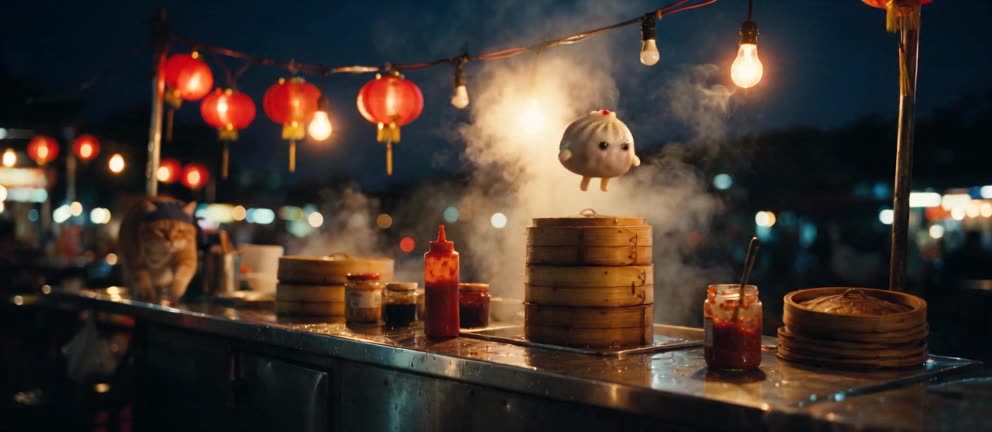
This is The Last Soup Dumpling, a 20-second short we shot ourselves. This case study lays out how it went from a one-line idea to a finished cut: how the character reference images were made, how the prompt was written, what happened when we shot the same scene three times each with two different prompt styles, and how we picked this take out of six.
Every step comes with the real material — including the versions that didn't work.
Stage 1: turn the idea into a chain of cause and effect
The one-line idea was "a night-market cat chases a runaway soup dumpling". You can't shoot that — the model doesn't know who moves first, how many times the chase repeats, or how it ends. So the first step is to write it as a chain of cause and effect you can see:
- Bao (the dumpling) jumps from a steamer onto the counter and runs right; Ah-Ju (the cat) charges after it from the rear-left.
- First grab: Bao kicks a steamer lid backward and it lands on Ah-Ju's paw.
- Second grab: Bao squeezes a chili-sauce bottle backward, hits Ah-Ju on the nose, and the cat sneezes.
- Third grab: Bao bounces off Ah-Ju's head into a steamer, and the lid drops shut.
- Ah-Ju lifts the lid: twelve identical dumplings, and only the one in the middle winks back.
That chain sets the spec: five shots, two characters, one location, 20 seconds. The comedy is the classic "three escalating attempts, then a twist" — each attempt gets closer, each gets interrupted, and the last one fails in a different way.
Spec tip: for multi-shot scenes, start at 15–20 seconds, one location, two characters. Push to 30 seconds and three or four characters and the number of things you have to control multiplies.
Stage 2: character reference images — the first version got sent back
We made one reference image each for the two characters and the night-market set, using the Studio's image mode (Develop). Reference images follow three fixed rules: a single character, full body, plain light-gray seamless backdrop. The cleaner the backdrop, the less the model picks up from whatever else is in the frame.
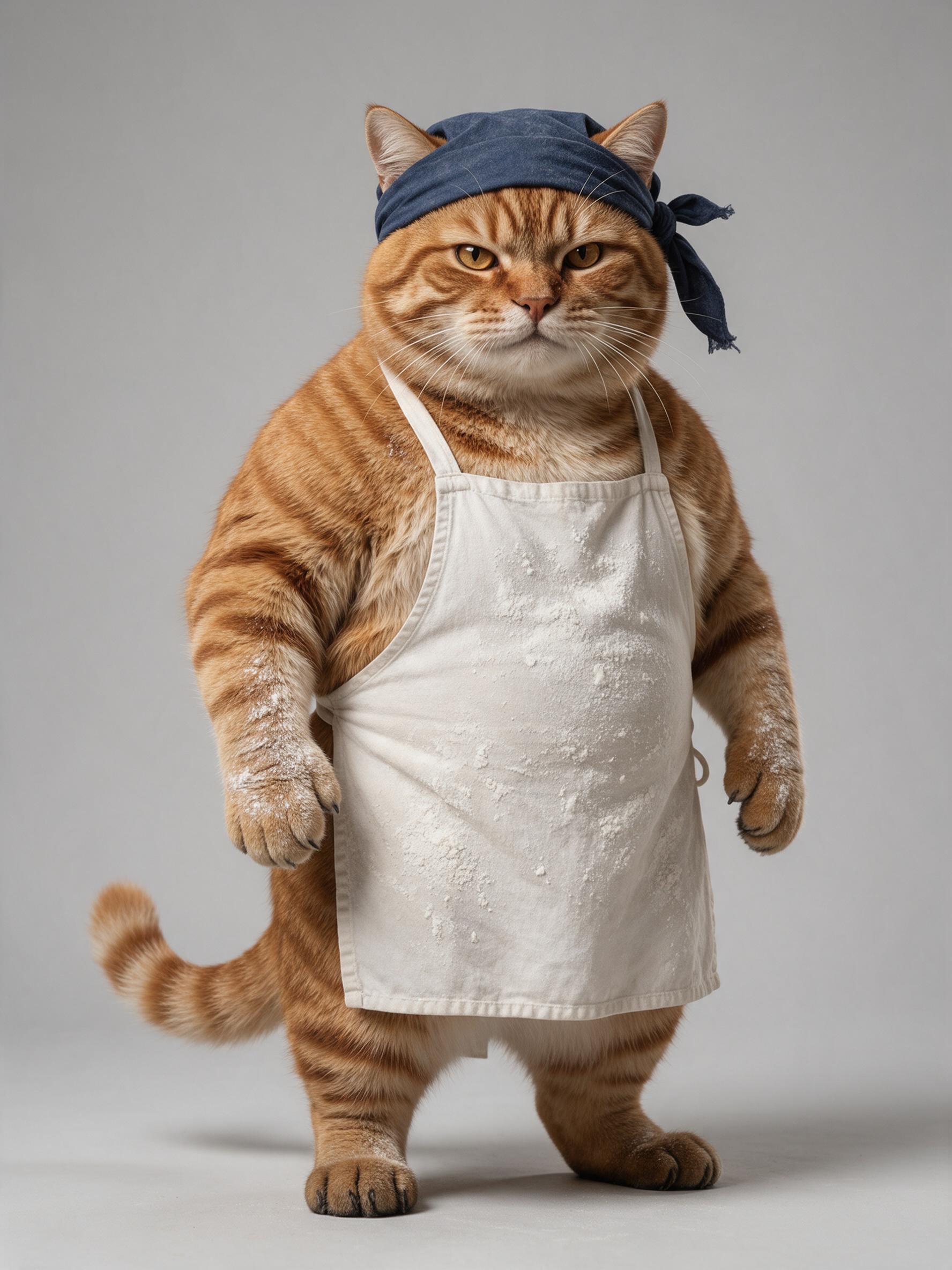
Ah-Ju worked on the first try:
Bao's first version had two problems:
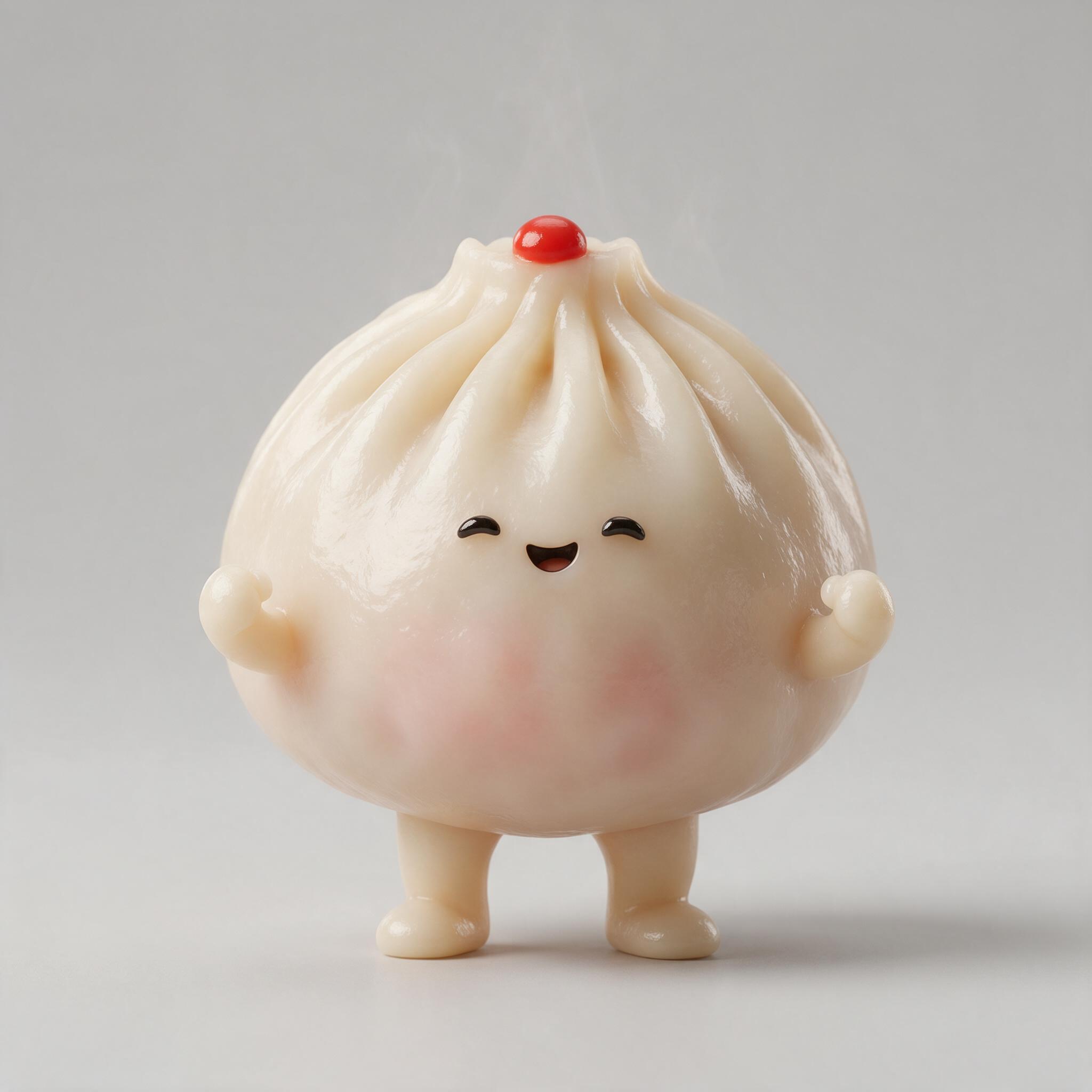
- The eyes are closed in a smile. But the ending needs Bao to open one eye and wink — with closed eyes in the reference, the video is likely to keep them closed.
- It looks like a glossy toy. A reference that leans toward a 3D figurine pulls the video toward a CG look, which fights the "live-action" requirement.
For the regeneration, the prompt said explicitly "open round black-bean eyes, not closed smiling arcs" and "real steamed matte dough, not a plastic toy":
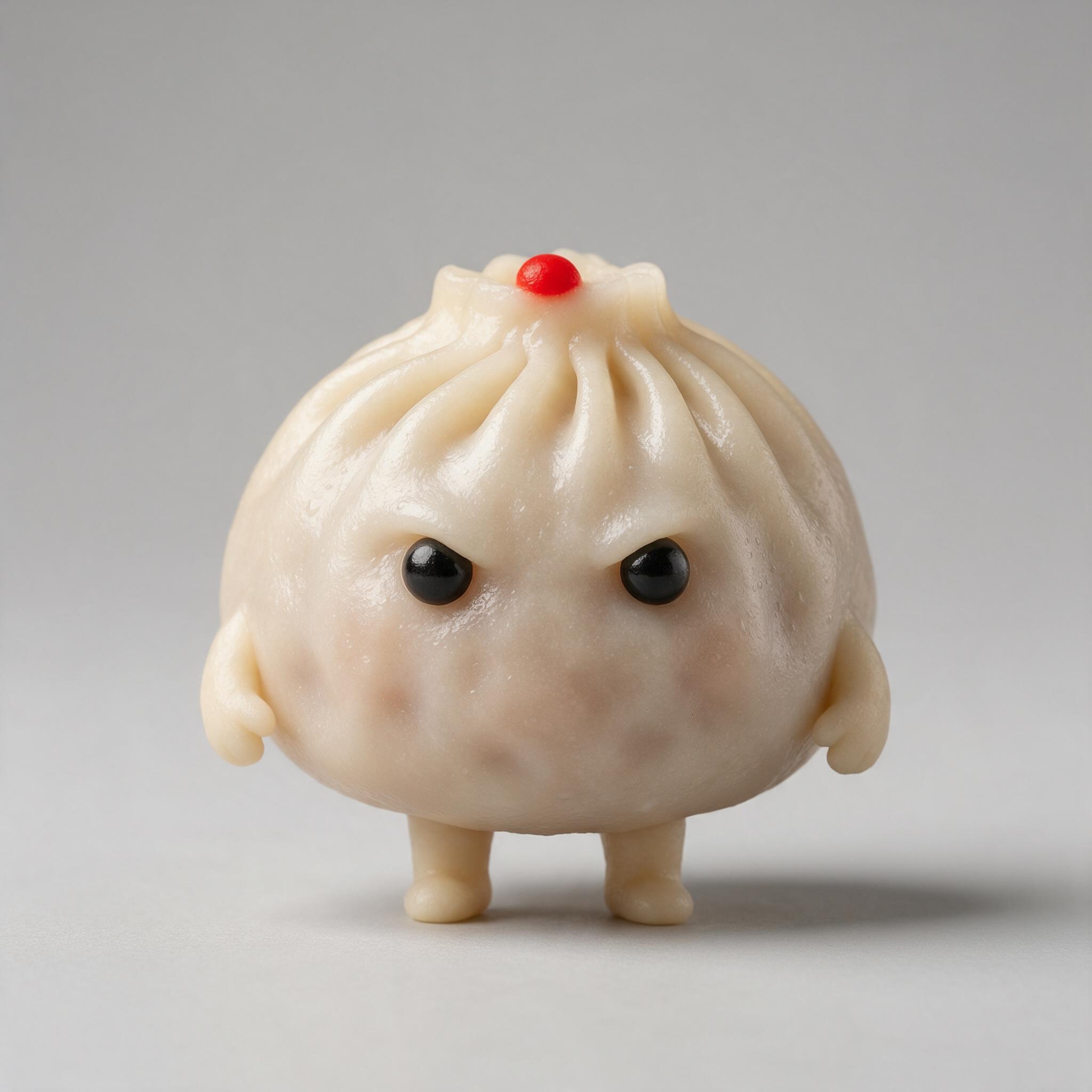
The first version also had two little arms we never asked for. But Bao has to grab the sauce bottle in the story, so arms actually make sense — this time we changed the prompt to match the reference and added "two short dough arms at its sides" to the character description.
The lesson from this stage: the reference image and the prompt have to agree, item by item. When the text and the image disagree, the model may follow either one, and you can't predict which — so rather than gamble, make both sides match before you submit.
Each character also gets one identifier, and the prompt says it stays on for the whole film: for Ah-Ju it's the navy bandana and white apron, for Bao it's the red dot on top. The ending only works because just one of the twelve dumplings has that dot.
Stage 3: write the prompt as eight layers
Don't write the prompt as a paragraph of adjectives — write it as a production document for a film crew. This short's prompt has eight layers, and each one does one job:
| Layer | What it controls | What this short says |
|---|---|---|
| 1. Overall look | Live action or animation | Real live-action texture, 35mm film grain; no 3D-render look, no cartoon outlines |
| 2. Camera | Lenses, camera position, cutting | 28–40mm, handheld tracking at counter height; the chase always runs left to right, Bao always front-right, Ah-Ju always rear-left, never crossing the axis; hard cuts only, every cut changes shot size and camera position together |
| 3. Light and color | Light direction, color balance | 60% blue-black night and warm bulbs, 30% steel, bamboo and steam, 10% red lanterns, chili sauce and Bao's red dot |
| 4. Physics | How things move, how heavy they are | Ah-Ju heavy, Bao light; the steamer lid has weight and flies in an arc; the sauce is a viscous liquid |
| 5. Character binding | Who each reference is | "Ah-Ju corresponds to @圖片1. Use only the appearance, fur color, and clothing. Do not use the background of the reference image." |
| 6. Shots | What happens in each shot | Five stages, each with initial state / main event / end state |
| 7. Consistency | What must never change | Character count, identifiers, direction, three grabs getting closer, exactly one slow-motion moment |
| 8. Sound | What you hear and don't | No music, no dialogue; every location sound listed, including the beat of silence at the final lid lift |
Two techniques worth copying:
- Measurable escalation. Not "the chase gets closer", but "about thirty centimeters → claw tips touching the pleats → both paws almost closed". Numbers and visible states give the model a concrete target, and let you check each one when reviewing.
- One exception only. "Only the chili-sauce beat is in slow motion; everything else is real time." An effect allowed exactly once doesn't creep into every shot.
Stage 4: the same scene, two prompt styles, three takes each
There are two common ways to write the shots layer, and we wanted to know which holds up better. So we kept the content identical, changed only how time is written, and shot three takes of each:
- Version A: a storyboard with seconds —
S3 (7-11s) Second grab… - Version B: stages —
[Stage 3] Continue from the previous stage: … Main event: … End state: …, with no seconds
| Check | A (seconds) | B (stages) |
|---|---|---|
| Three grabs get closer each time | 3/3 | 3/3 |
| Left/right never flips | 3/3 | 3/3 |
| Sauce stays on the nose to the end | 1/3 | 3/3 |
| Clear one-eye wink | 2/3 | 2/3 |
| Ends on a cut to black | 3/3 | 2/3 |
| Cuts land on the planned seconds | 3/3 (within 0.5s) | Freer pacing |
The biggest gap is in carrying state over. This is one of the A takes — after the sauce hits, the nose is clean in the very next shot:
The difference comes from one line at the start of each B stage:
[Stage 4] Continue from the previous stage: red sauce still on Ah-Ju's nose.
Version A only wrote "red sauce on Ah-Ju's nose" at the end of the previous shot and never mentioned it again. A state that isn't written into the next stage is easily dropped at the cut — whatever you need carried over, restate it at the start of every stage.
As for seconds: version A really did pin its cuts precisely. So when a cut has to land on a specific second — a music beat, say — seconds are useful. For an ordinary scene, stages are enough.
Three takes each is a tendency, not proof. But a gap of 1/3 against 3/3 is big enough to change how we write.
Stage 5: review — picking one take out of six
Every take was checked against the same list:
- Does each grab get closer than the last?
- Do the cat and Bao ever swap sides?
- Does the sauce stay on the nose to the end?
- Is the ending a clear one-eye wink?
- Does it end on a cut to black?
The fastest way to look is to pull one frame per second into a contact sheet — 20 frames for 20 seconds, the whole take at a glance. Three of the six passed all five checks; one of those had a single grayed-out dumpling frame in the middle, and of the remaining two we picked the B take — the one at the top of this page. The others each lost points: sauce vanishing midway, both eyes squinting at the end, no cut to black, and one with a fisheye vignette.
One frame per second shows you the structure, not details that last a frame or two (like whether the sauce really comes out of the bottle). Before you lock a take, still watch it once at normal speed.
What this short cost
| Item | Quantity | Credits |
|---|---|---|
| Reference images (2K) | Ah-Ju, Bao, the market set, plus one Bao regeneration — 4 images | 4 × 7 = 28 |
| 20-second video (480P) | 3 takes each of versions A and B — 6 videos | 6 × 288 = 1,728 |
| Total | 1,756 |
(Prices as of September 2026.) The six A/B takes were shot to compare prompt styles. If you already know you're using stages, shooting two or three takes per shot and picking one is the more usual approach.
Six techniques to take from this case
| Technique | How to write it | Example from this short |
|---|---|---|
| One unique identifier | A small thing only the lead has | Only Bao has the red dot |
| State at the start of every shot | Restate what carries over at the top of the next shot | "Continue from the previous stage: red sauce still on the nose" |
| Measurable escalation | Use distance, count or size to show "more each time" | thirty centimeters → touching the pleats → almost caught |
| One exception only | An effect allowed exactly once | Only the chili-sauce beat is in slow motion |
| Locked direction | Who is left, who is right, which way they move | Cat rear-left, Bao front-right, both moving right |
| Reference and text agree | Image and description match item by item; if they don't, change one side | Bao's first version had arms → the text changed to match |
Going further: joining two clips into one long take
When one clip isn't long enough, shoot two and join them. The trick is to leave a handoff action at the end of the first clip and open the second on exactly the same image. For example, the first clip ends with a character switching off a lamp, leaving only a little light; the second opens in that same darkness before another light comes on — cut together, it reads as one long take where the light goes out and comes back.
To make the join tighter, use the last frame of the first clip as a reference image for the second, and name it as the first frame in a single sentence:
@圖片1 is the first frame. It defines the opening composition, the character's position and pose, and the camera direction.
Keep that sentence on its own. Add "does not change the first-frame composition defined by @圖片1" to the role sentence of every other reference image.
Troubleshooting
| Problem | Most likely cause | Fix |
|---|---|---|
| Characters flip left and right | No direction rule | In the camera layer, state who is left, who is right and which way they move |
| A wound or stain disappears in the next shot | The state was written only at the end of the previous shot | Restate it at the start of the next shot with "Continue from the previous stage" |
| An extra character appears | References have no role, or no character count | One role sentence per image; state "only N characters in the entire film" in the consistency block |
| The reference's background shows up | No "do not use the background" | Add it to every binding sentence |
| The character's expression doesn't match what you asked for | The reference image itself has that expression | Regenerate the reference instead of fighting it in text |
| Unwanted music | The sound layer is empty | Write "no background music", then list the location sound |
Your turn
Follow the same order as this case: one-line idea → chain of cause and effect → one clean reference image per character → an eight-layer prompt → two or three takes per shot → pick with a checklist.
Make reference images in the Studio's image mode with Develop; for the video, switch to video mode, attach your references, pick Seedance 2.5 and hit Shoot.